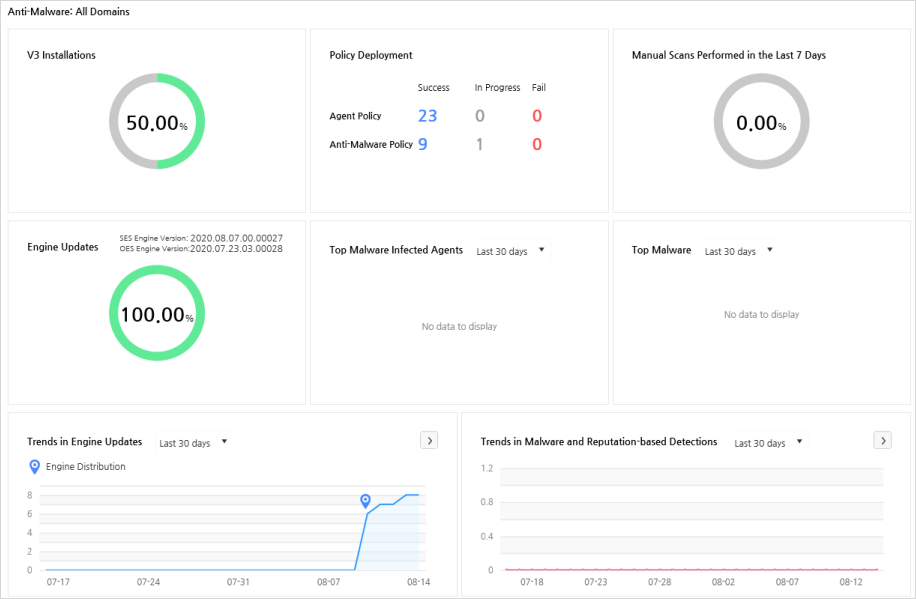
You can check the status for policy distribution and V3 installation in Security agents for all domains. You can also check the policy distribution status, manual scan rate, malicious code infection and engine update to the latest version, as well as V3 installation status.
You can view the following information from Anti-Malware:
You can view the V3 installation rate, policy distribution status, manual scan rate for the last 7 days, latest version update for engine, top malware-infected agents, engine distribution status, malicious code and malware detection status in Security agents for all domains. V3 installation rate shows the individual rate for desktop and server. Policy Status shows the total number of agents for the Security agent policies distributed from a server and the V3 policy distribution status (Applied/Applying/Not Applied).
Displays V3 installation rate both for desktop and server operating systems installed in agents, where V3 should be installed. Click the installation rate to move to V3/EDR Information in Management > Agent Status and then you can view the detailed agent information where V3 is installed.
Displays Security agent policies distributed from a server and V3 policy distribution status. Categorizes the policy distribution status by Applied/Applying/Not Applied. When a policy is applied, Applied, when a policy is being applied, Applying, and when a policy is not applied yet, Not Applied will be displayed.
 Note
Note
The status of agents which cannot access the server and therefore cannot have policies deployed, is also displayed not deployed.
Displays the manual scan performed for the last 7 days. Also displays the number of manual scans run in a desktop or a server.
Displays the rate for the latest version of engine update in the agents. Also displays the individual number of desktops and servers where the latest version of engine is installed. The latest version of engine shows the very last date when the engine was updated as shown in Settings > Agent > V3 Security Check Settings.
Note
SES (Stable Engine Service) Engine: To be released approximately
3 days after the OES engine released.
OES (Official Engine Service) Engine: The latest version of engine released.
Shows the ranking of agents with the malware infected. Agents with more malware detections are in the higher rank and their IP addresses are also displayed. You can select a period; last 24 hours, last 7 days or last 30 days. Click an agent IP address to move to Malware Infection Information in Log > Agent and then you can view the agent information and the detailed malware information detected (malware name, infected file path, hash value and status).
Shows the ranking of most frequently detected malware. You can select a period; last 24 hours, last 7 days or last 30 days. The diagnosed malware name is shown on the left side of the page and the number of detects is shown on the right side of the page. Click the name of malware to move to Malware Infection Information in Log > Agent and then you can view the agent information and the detailed malware information detected (malware name, infected file path, hash value and status).
Displays the release installation status by period. You can select a
period; last 24 hours, last 7 days or last 30 days.
Click View Details to move to V3
Update in Log > Agent
and then you can view the update logs. Click Engine
Distribution( ) to confirm the number of agents
where the latest version of engine is installed and the last distributed
engine version (SES or OES). Hover the mouse under the icon for Engine Distribution() to
display the last distributed engine version.
) to confirm the number of agents
where the latest version of engine is installed and the last distributed
engine version (SES or OES). Hover the mouse under the icon for Engine Distribution() to
display the last distributed engine version.
You can view the trend for malicious codes and reputation-based detection by specified period. You can select a period; last 24 hours, last 7 days or last 30 days. Click View Details to move to Malware Infection Information in Log > Agent and then you can view the agent information and the detailed malware information detected (malware name, infected file path, hash value and status). Hover the mouse over the time when a malware detected or reputation-based detection is done, Malicious codes/number of reputation-based detections.