Exploring User Interface
Management
console is the user interface for management center.
 Note
Note
The tab
menus are activated based on user privilege and product license. For more
details on privileges and license, refer to Settings
> Administrator > Administrator
Account and Settings
> System > License, respectively.
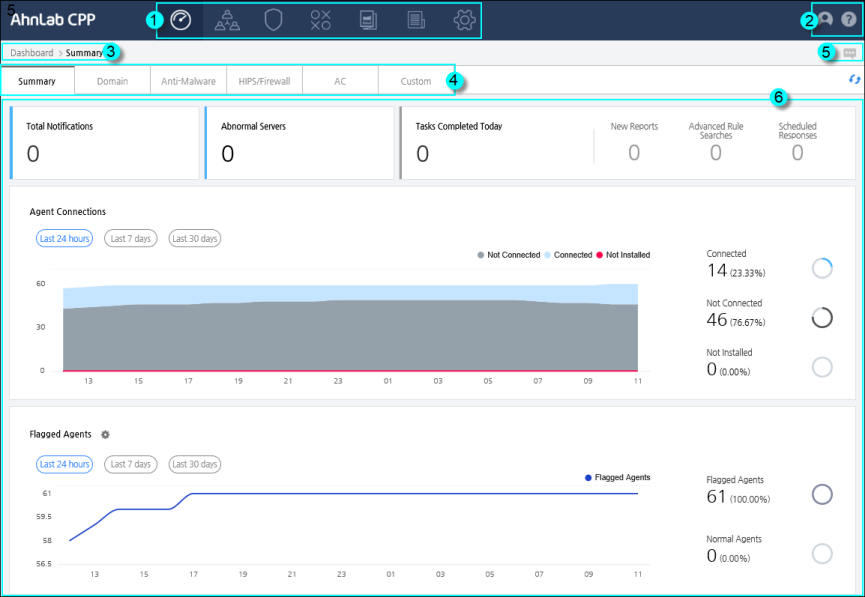
Console Interface
The console is divided into six areas.
1. Main menu
- Dashboard is made up of the Summary, Domain,
Anti-Malware, HIPS/Firewall, and AC tabs, where you can see the summary
of the corresponding information. On the Custom tab, you can select
different information segments to display on your custom dashboard.
- Management is made up of Agent, Security Product,
Software, IPS Overview, and AC Overview tabs. From the Agent tab,
you can manage agent groups and send remote commands to the agent.
On the Security Product tab, you can add and distribute security products
to the agents. On the Software tab you can check the software installed
in agents. On the IPS Overview tab, you can check the default and
custom IPS signature used to detect network intrusion attempts. On
the AC Overview tab, you can check the overview of file execution
controls and the response methods.
- Response is made up of Response Overview, Response
Schedule, and AhnReport Collection tabs. On the Response Overview
tab, you can check the job progress and retry failed commands. On
the Response Schedule tab, you can filter the job depending on status,
type or interval to see the schedule. On the AhnLabReport Collection
tab, you can see the list of collected AhnReports.
- Policy/Advanced Rules is made up of Policy
and Advanced Rules tabs. You can check or specify the policy or rule
accordingly.
- Report is made up of Calendar, Template, and
Overview tabs. You can check the created reports on the calendar,
create report templates or manage reports respectively.
- Los is made up of Server and Agent tabs. You
can check the logs created on the servers and agents respectively.
- Settings is made up of multiple sectors, including
system, cloud system, integration, agent, database and agent.
2. Account/Help
- Account: Displays the currently logged in admin
information and simultaneously logged in admin.
- Help: Displays Help.
- About: Displays the copyright information,
and admin console and server version.
3. Navigation Menu
- Displays the location of the currently opened
page.
4. Tab Menu
5. Notification Center
6. Task Area