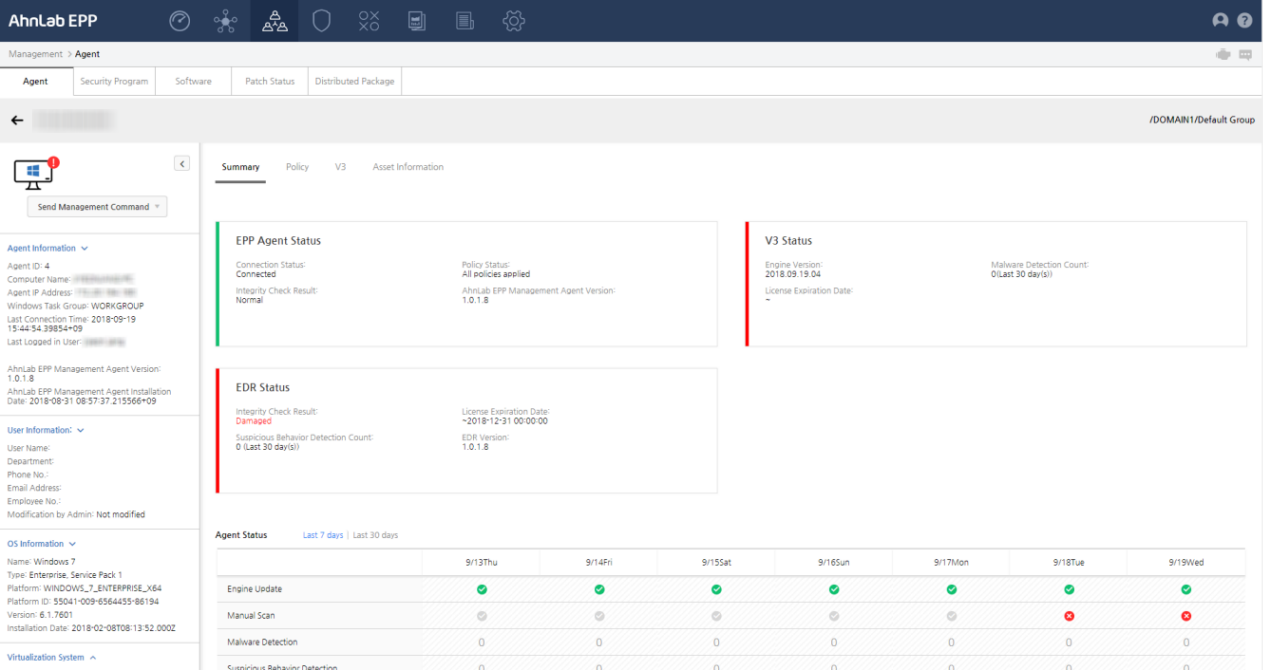
Detailed Agent Status
Displays the agent's information (IP address, user information,
OS and virtual group status), policy deployment status, and information
on assets and shared folders.
Agent Details
Check the agent's server connection status, integrity status, policy
deployment status and agent installation version by each licensed product;
and send management commands to individual agents. In agent status, check
the status of the agent's licensed product.
Send Management Command
Send a management command to an agent (Management Commands) or collect
information.
Agent Information
Check information on the agent, user, OS and virtual system, and detected
malicious files and suspicious behaviors.
- Agent Information: The agent information.
- Agent ID: The agent's ID.
- Computer Name: The computer name set on the
agent's Windows system.
- Agent IP Address: The agent computer's IP address.
If there are more than two IP addresses, the IP address that is actually
connected to the server is displayed.
- Windows Task Group: Windows task group name.
- Last Connection Time: The agent's last connection
time.
- Logged in User: The Windows account that is
currently logged in to the agent computer.
- AhnLab EPP Management Agent Version: The AhnLab
EPP Management agent's version.
- AhnLab EPP Management Agent Installation Date:
The AhnLab EPP Management agent's installation date.
- User Information: The agent user's information.
- User Name: The agent's user name.
- Department: The agent user's department.
- Phone No.: The agent user's phone number.
- Email Address: The agent user's email address.
- Employee No.: The agent user's employee number.
- Modification by Admin: If the administrator
modified the information, Modified and
if not, Not modified
- OS Information: The agent computer's OS information.
- Name: The agent computer's OS name. e.g.) Microsoft
Windows 7 Enterprise K
- Type: The agent computer's OS name and service
pack. e.g.) Microsoft Windows 7 Enterprise K Service Pack 1 64-bit
- Platform: The agent computer's OS platform.
e.g.) Windows NT
- Product ID: The agent computer's OS product
ID. The product ID can be checked from the Control Panel.
 Note
Note
On Windows 7, the Platform ID is the Product
ID under Windows activation in Control Panel
> System and Security > System.
- Version: The agent computer's OS version. On
Windows 7, the OS version can be checked using the winver
command from the Start menu. e.g.) 6.1
- Installation Date: The agent computer's OS
installation date.
- Virtualization System: The agent's virtual
system information.
- Virtual Environment: The agent's virtual system
status. Enabled, if virtual environment
is used, and if not, Disabled.
- Host OS ID: The Host OS ID collected from the
virtual system's server. The data format may differ according to the
virtual system.
Summary
Displays the agent's and V3's statuses.
EPP Agent Status
Check the agent's status.
- Connection Status: The agent's server connection
status.
- Connected (
 ): The server
and agent are connected.
): The server
and agent are connected.
- Not Connected (
 ): The server
and agent are not connected.
): The server
and agent are not connected.
- Policy Status: The agent's V3 policy application
status - Deployed (
 ), Deploying
(
), Deploying
( ) or Failed (
 ).
).
- Integrity Check Result: The agent file's integrity
check result.
- Normal: The file is not corrupted.
- Corrupted: The file is corrupted.
- Unknown: The file's integrity check result
is unknown.
- AhnLab EPP Management Agent Version: The agent's
version.
V3 Status
Check V3's status.
- Engine Version:
V3'e engine version. e.g.) 2018.03.13.01
- Malware Detection
Count: The latest number of detected and repaired malware. e.g.) 10
/ Ignored:0 (Last 30 days)
- Suspicious
Behavior Detection Count: The latest number of detected suspicious
behaviors.
- License
Expiration Date: V3's license expiry date. e.g.) ~2023-04-17 00:00:00
EDR Status
Check EDR's status.
- Integrity
Check Result: The EDR file's integrity check result.
- Normal: The
file is not corrupted.
- Corrupted:
The file is corrupted.
- Unknown: The
file's integrity check result is unknown.
- License Expiration
Date: EDR's license expiry date.
- Suspicious
Behavior Detection Count: The latest number of detected suspicious
behaviors.
- EDR
Version: The EDR's version.
Agent Status
Check the security status of V3,
EDR and the agent's detection status.
- Engine Update:
V3 engine's update status. Click the (
 ) icon to
check the engine version. e.g.) 2018.03.13.01
) icon to
check the engine version. e.g.) 2018.03.13.01
- Manual Scan:
The manual scan status by date.
- Malware
Detection: The number of detected malware.
- Suspicious
Behavior Detection: The number of detected suspicious behaviors.
Policy
Check the policy name, policy application status and individual policy
status; and change the policy.
- Policy Type: The policy type - Agent, V3 or
EDR.
- Policy Name: The policy name.
- Distribution Status: The policy application
status - Distributed/Distributing/Failed.
- Individual Policy: The individual policy status.
Enabled, if used.
- Policy Change: Change the policy. Click [Change Policy] and change the policy, and
click OK.
V3
Check the details on V3.
V3 Information
- Installed Security
Program: The V3 installed on the agent.
- Engine Version:
V3's engine version.
- Last Scan Date:
V3's last scan date.
- Real-time Scan:
V3's real-time scan status - Enabled (
 ) or Disabled
(
) or Disabled
( ).
).
- Serial
Number: V3's serial number.
No. of malware detections in last 30
days
- View Logs:
The malware scan log. Click [View Logs]
next to No. of malware detections in last 30 days, or go to Logs > Agent
> Malware Infection Information.
- Date: The malware
detection date.
- Malware Name:
The diagnosed malware name.
- Infected File
Path: The infected file path.
- Status: The
malware repair status.
- Scan Type:
The malware scan method - Real-time or Manual.
- Owner: The
owner of the infected file.
- Accessed Computer
Name: The name of the computer that accessed the infected file.
- Infected
Computer Name: The name of the infected computer.
Asset Information
Software
Check the software change history and details.
- Last Update Time: The software status' last
update date and time. e.g.) 2018-03-13 04:41:24
- Software Change History: The addition and deletion
of software. Select a period - Last 7 days
and Last 30 days.
- Software added: The
software installed on the agent. Place the cursor on the icon to check
the number of software added and its name. e.g.) Installed Software:
1 / AhnLab EPP Agent
- Software deleted:
The software deleted from the agent. Place the cursor on the icon
to check the number of software removed and its name.
Note
Only a super admin can view Software
Change History.
- Installed Software: The software installed
on the agent.
- Export: Export the installed software information
in csv, xlsx or pdf formats.
- Name: The software name. e.g.) Notepad++ (64-bit
x64)
- Publisher: The software's publisher. e.g.)
AhnLab, Inc.
- Version: The software version. e.g.) 4.0.2.42
- File Size: The software size.
- Installation Date: The software's installation
date.
Hardware
Check the hardware change history and details.
- Last Update Time: The hardware status' last
update date and time. e.g.) 2018-03-13 04:41:24
- Hardware Change History: The addition and deletion
of hardware. Select a period - Last 7 days
and Last 30 days.
- Hardware added: The hardware installed on the
agent. Place the cursor on the icon to check the number of hardware
added and its name.
- Hardware deleted: The hardware deleted from
the agent. Place the cursor on the icon to check the number of hardware
removed and its name.
- Installed Hardware: The hardware installed
on the agent. The table displays the Items based on the hardware type,
and Detailed Information displays the hardware details.
- Export: Export the installed hardware information
in csv, xlsx or pdf formats.
- CPU: The CPU name, speed and version. e.g.)
Intel(R) Core(TM) i7-6700 CPU @ 3.40GHz / 3.40GHz / Intel64 Family
6 Model 94 Stepping 3
- Memory: The Physical Memory (MB) and Virtual
Memory (MB) size. e.g.) 8 / 15.765
- BIOS: The BIOS firmware date and name, Manufacturer
and F22 version. e.g.) 2016-11-01 / Default System BIOS / HP / N01
Ver. 02.17
- Display: The Monitor Resolution (Pixel) and
Graphic Card Type/Chipset/Memory Size (MB). e.g.) 1280 x 1024 / Intel(R)
HD Graphics Family / Intel(R) HD Graphics 530 / 1024
- Disk: The NTFS available space and volume size.
e.g.) 461.979/540.379MB
- Network: The host name, Internet Explorer version,
NIC information and Winsock version. e.g.) user3-PC / 11.0.9600.18920
(KB4074736) / 70-5a-0f-4d-19-1b
Shared Folder
Check the agent's shared folder information.
- Sharing Method: The sharing method - System
Sharing (Windows' printer, device and IPC sharing) and General Sharing
(user's disk drive or folder sharing).
- Name: The shared folder name. e.g.) IPC$, C$
- Path: The shared folder or file path.
- Permissions: The shared folder's permissions
- Read, Write (Password), Read/Write, Read/Write (Password), Administrative
Shared Folders.
- Read/Write: Read and write allowed on the folder.
Write permission may cause security issues.
- Information Update Time: The shared folder's
last update time.
Patch
Check the patch installation status.
Distribution Information
Check the distribution package
status, and the reason if it could not be distributed.
- Package
Name: The distribution package name created when creating the package.
- Distribution
Status: The distribution package's agent distribution progress - Not Distributed or Distributed.
- Result:
The reason the distribution package could not be distributed - Download failed, Execution failed, Distribution File
Information corrupted, Download prohibited time or Insufficient disk
space.
- Update
Time: The distribution information update time.