|
Smart Update updates products of AhnLab to the latest version by using Smart Update Utilities.
Run Smart Update to block, detect, and repair new viruses, spyware, or worms and keep the engine and products up-to-date. After installing AhnLab's products, run Smart Update Utility to update the products so that new viruses, spyware, and worms can be detected and properly treated.
Main Features
Engine File Update
An engine file detects and repairs viruses, spyware, and worms. To detect and repair new viruses, spyware, or worms, the engine file must be updated.
Patch File Update
This file improves the features or corrects errors of the product. By using Smart Update Utility, you can easily patch the product.
Automatic Update, Scheduled Update
You can set update interval or schedule an update to run update automatically at specified times.
|
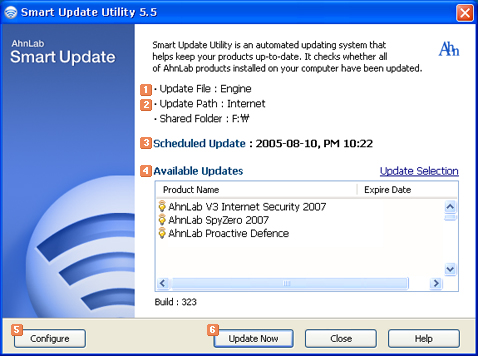
  Update File Update File
Files will be updated by Smart Update. Engine and patch files will be updated.
 Access Method Access Method
Select a method to download files to update. You can either update through the Internet or the shared network drive. If you click Configure, you can change the access method.
 Scheduled Update Scheduled Update
You can check the next scheduled auto-update. If you click Configure, you can schedule for the update.
 Available Updates Available Updates
Programs will be updated by Smart Update. If you click Update Selection, you can select programs or files to update.
 Configure Configure
You can configure the update settings for Smart Update Utility.
 Update Now Update Now
Downloads the necessary files for the update from the update server.
|






