Warning
There are two ways to update the AhnLab EPP server.
Warning
Upload Server File uses Distribution Services to install
the update file through the network using yum commands. So, if there are
restrictions in the distribution settings, disable it first to update
the server.
In Update > Domain Settings > Distribution
Server, specify the following settings:
1) Blocked Distribution IP Address: Make sure
there is no domain servers.
2) Max Simultaneous Connections: Make sure
it is below 256 (default).
3) Transfer Speed Limit: Make sure it is above
51200 KB/s.
4) File Distribution Prevention Time: Make
sure the update time does not fall under the update time.
Use Server Update on the console to send the installation file to the server and update all the servers in the domain at one time. When the update is completed, log in to the web console again. The time it take to complete the update may differ based on the server environment. Server Update is in Dashboard > Domain > Upload Server File. To update the server using Server Update:
 Note
Note
epp_installer.tar file is the rpm file (epp_installer-1.0.0.5-1133.x86_64.rpm)compressed using the tar cvf command.
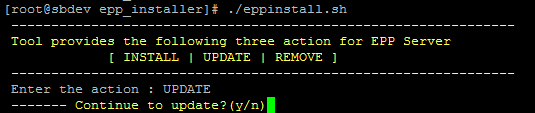
Updating the server using Ansible is similar to installing the server. Select UPDATE to update the server. When the update is complete, Latest Patch Version will change. For more information on updating from the terminal using Ansible, refer to Install EPP Server.