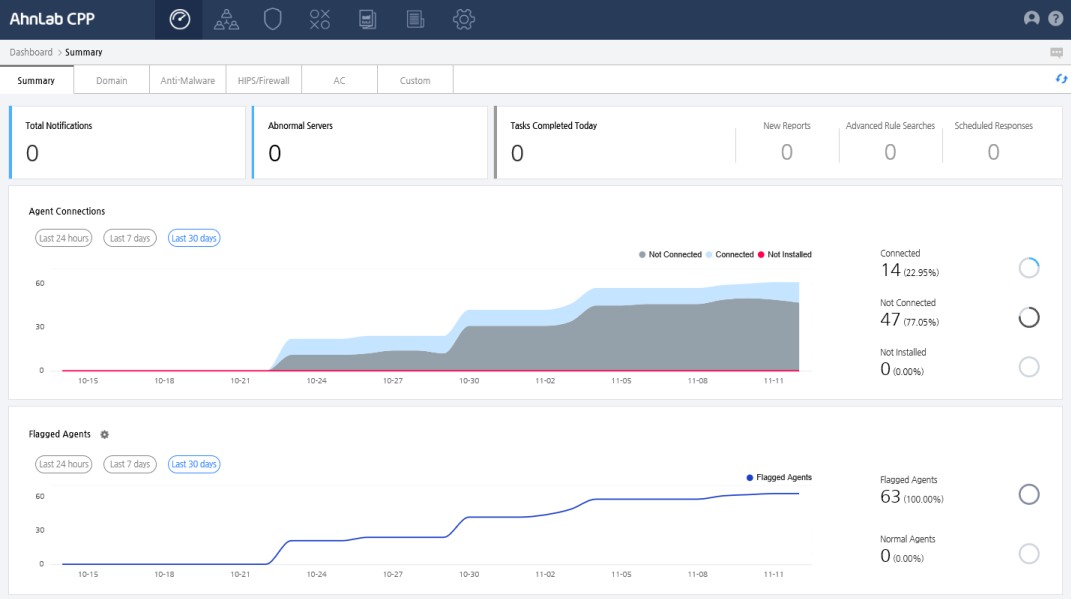
Check the abnormal server status, agent status and flagged agent of the entire domain. You can also check the summary of tasks done today, created reports and scheduled response.
Summary includes:
The Overview bar on top of the page displays statistics for the following key information. Click on the number to see details.
You can check the graph of the agent's server connections and the number of vulnerable agents by period. Select a date range to search from the last 24 hours, last 7 days, or the last 30 days.
 ): Displays the
number of agents connected to the server. Click the number under Connected
to go to agent information part in the Agent Status page to see the
details. The number in parentheses indicates the percentage of agents
connected to the server out of all agents.
): Displays the
number of agents connected to the server. Click the number under Connected
to go to agent information part in the Agent Status page to see the
details. The number in parentheses indicates the percentage of agents
connected to the server out of all agents.  ): Displays
the number of agents that are not connected to the server. Click the
number under Not Connected to go to agent information part in Agent
Status page to see the details. The number in parentheses indicates
the percentage of agents that are not connected to the server out
of all agents.
): Displays
the number of agents that are not connected to the server. Click the
number under Not Connected to go to agent information part in Agent
Status page to see the details. The number in parentheses indicates
the percentage of agents that are not connected to the server out
of all agents.  ): Displays the
number of agents which is categorized into vulnerable group. Click
the number under Vulnerable to go to the agent information part in
Agent Status page to see the details. The number in parentheses indicates
the percentage of agents that are categorized into vulnerable out
of all targeted agents.
): Displays the
number of agents which is categorized into vulnerable group. Click
the number under Vulnerable to go to the agent information part in
Agent Status page to see the details. The number in parentheses indicates
the percentage of agents that are categorized into vulnerable out
of all targeted agents.
You can check the graph of flagged agents by period. Select a date range
to search from the last 24 hours, last 7 days, or the last 30 days. If
you click Settings ( ), you can set the conditions
for agents that have issues on the <Issue Condition Settings> page.
), you can set the conditions
for agents that have issues on the <Issue Condition Settings> page.
 ): Display
the total number of agents that have issues. Click the number under
Flagged Agents to go to flagged
agents page to check the detailed information. The number in parentheses
indicates the percentage of agents that have issues out of all agents.
): Display
the total number of agents that have issues. Click the number under
Flagged Agents to go to flagged
agents page to check the detailed information. The number in parentheses
indicates the percentage of agents that have issues out of all agents.