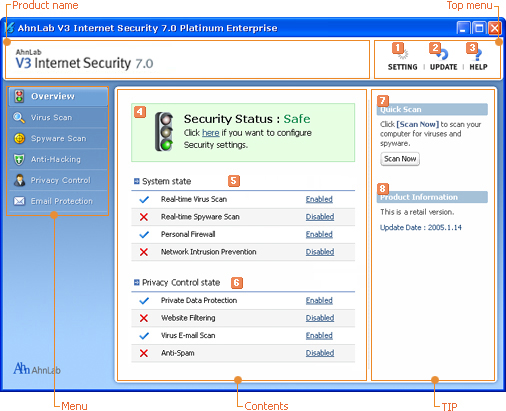
Configure
You can set restrictions for using AhnLab V3 Internet Security 7.0 Platinum Enterprise or necessary rules for management.
 Update
Opens Smart Update Utility where you can update engines and programs.
 Help
Help
You can see AhnLab V3 Internet Security 7.0 Platinum Enterprise Help or check the latest viruses and product Information. Also you can choose to display Welcome Screen.
 Security Status
You can check the current security status of your computer. If you click Security Status area, Auto Protection Settings will appear and you can turn on security features.
 System Security Status
You can check settings status for real-time system scan which protects your computer from malicious codes and hacking attempts.
 Internet Security Status
You can check and configure settings for Internet security and privacy protection.
 Quick Scan
If you click Scan Now, only the files and folders that are vulnerable to viruses infection will quickly be scanned and repaired.
 Product Information
You can check the date for engine update. You can enter product serial number for the product you purchased and renew subscription after expiration.