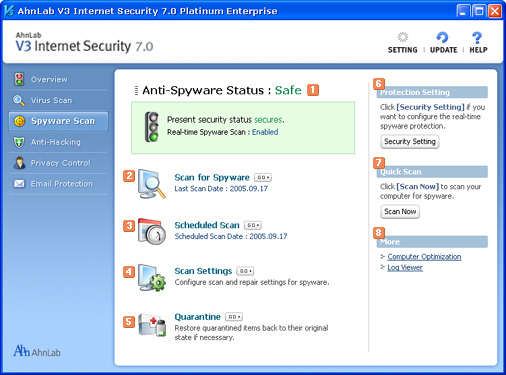
Anti-Spyware Status
Shows anti-spyware status. When security status is "At Risk" or "Attention" , click Security Setting in Protection Setting on the right, and turn Real-time Spyware Scan on.
 Scan for Spyware
Scans for and removes spyware.
 Scheduled Scan
Automatically scans for spyware at the time you chose.
 Scan Settings
Configures scan and repair settings for spyware.
 Quarantine
Opens Quarantine. Quarantine isolates and restores removed spyware.
 Protection Settings
Congifure the real-time spyware protection settings.
 Quick Scan
Scans your computer for spyware and cleans them.
 More
More
Computer Optimization
Cleans up unnecessary files and optimizes the memory usage.
Log Viewer
You can check the history of tasks you ran related to spyware security. Also you can check the history of spyware scan, repair, and prevention tasks done by AhnLab V3 Internet Security 7.0 Platinum Enterprise.