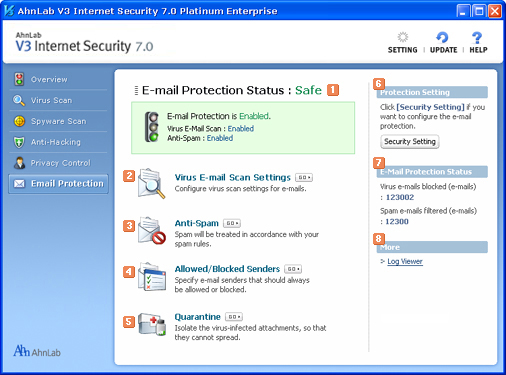
E-Mail Protection Status
Shows e-mail protection status. When security status is "At Risk" or "Attention" , click Security Setting in Protection Setting on the right, and turn Virus E-mail Scan and Anti-Spam on.
 Virus E-mail Scan Settings
Configures settings for e-mail scan and repair.
 Anti-Spam
Filters spam mails according to the spam rules.
 Allowed/Blocked Senders
Registers e-mail addresses to allow or block.
 Quarantine
Opens Quarantine. Quarantine isolates the virus-infected attachments.
 Protection Settings
Configures the e-mail protection settings.
 E-Mail Protection Settings
Shows the number of blocked e-mails and filtered spam mails.
 More
More
Log Viewer
You can check the history of tasks you ran related to e-mail security and virus-infected e-mails blocked by AhnLab V3 Internet Security 7.0 Platinum Enterprise.