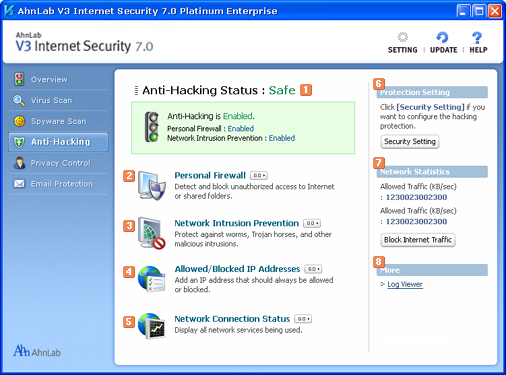
Anti-Hacking Status
Shows anti-hacking status. When security status is "At Risk" or "Attention" , click Security Setting in Protection Setting on the right, and turn Personal Firewall and Network Intrusion Prevention on.
 Personal Firewall
Detects and blocks unauthorized access to Internet and shared folders.
 Network Intrusion Prevention
Blocks worms, Trojan horses, and other malicious intrusions.
 Allowed/Blocked IP Addresses
Register IP adderesses that should always be allowed or blocked.
 Network Connection Status
Displays all network connection status.
 Protection Settings
Configure the hacking protection settings.
 Network Statistics
Based on firewall policy, you can see status for allowed or blocked traffic and connect or disconnect network.
[Caution] When a network is disconnected abruptly, the computer might not work properly.
 More
More
Log Viewer
You can check the history of tasks you ran related to personal firewall and network intrusion. Also you can check the anti-hacking history done by AhnLab V3 Internet Security 7.0 Platinum Enterprise.