AhnLab V3 Internet Security 7.0
Go to Ahnlab Homepage
Introduction

Tour

Alert Window
Alert window notifies the users whenever security threats such as virus, spyware, worm, and hacking occur and when there are information about engine or security update.

Types of Alert Window

Virus Outbreak Alert
The alert window will appear when security vulnerability is found.
The alert window will appear when new virus is spreading.
The alert window will appear when viruses are found by Real-time Startup Program Scan.

Real-time Spyware Scan Alert
The alert window will appear when spyware is blocked.

Hacking Outbreak Alert
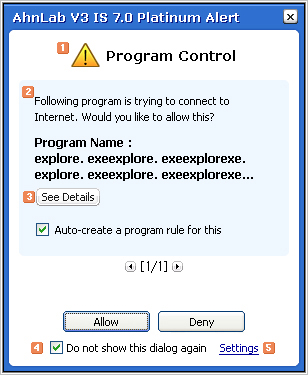
The alert window will appear when an unauthorized program connects to Internet.
The alert window will appear when files of an authorized program are infected by viruses or updated.
The alert window will appear when an unauthorized user tries to access the shared folder.
The alert window will appear when network intrusion is detected.

Urgent Privacy Control Alert
The alert window will appear when private data is disclosed via messenger.
The alert window will appear when private data is disclosed via e-mails.
The alert window will appear when the computer is connected to the phishing site.
The alert window will appear when phishing e-mails have been blocked.

Urgent E-Mail Protection Alert
The alert window will appear when virus e-mails are received via the POP3 server.
The alert window will appear when virus e-mails are sent via the SMTP server.

Event Message Alert

Alert Window Name

The name for alert window appears.

Alert Message

Security threats and update information are displayed.

See Details

If you click See Details, you can see detailed information about alert message.

Do not show this dialog again

The same dialog will not appear again.

Settings

If you click Settings, you can set alert features in Custom Alerts.